📑 Table of Contents
- Problem Understanding
- Requirements & Scope
- Core Algorithms
- System Architecture
- Implementation Details
- Scale & Optimization
- Advanced Considerations
1. Problem Understanding
🧠 What is a Rate Limiter?
A rate limiter restricts the number of requests a client or service can send to a system within a certain time period.
Examples:
- Max 2 posts per second per user
- Max 10 account creations per IP per day
- Max 5 reward claims per device per week
✅ Why Use a Rate Limiter?
-
Prevent abuse / DoS attacks Blocks excessive traffic from bots or malicious users.
-
Reduce costs Protects backend and expensive third-party APIs from overuse.
-
Stabilize server performance Prevents overload by enforcing request thresholds.
2. Requirements & Scope
🎯 Key Clarifying Questions
Before designing, ask these questions to define scope clearly:
What to Rate Limit?
- Is rate limiting per user, per IP, per API key, or something else?
- Do we need global limits (e.g., across all users) or per-tenant limits?
- Do different endpoints have different rate limits?
How Strict Should the Limits Be?
- Is some short-term bursting allowed, or is the rate strictly enforced?
- Should the limiter reset after a fixed window, or use a sliding window?
- How should we handle requests that just barely exceed the limit?
User Tiers & Roles
- Do different user types (free, premium, admin) have different limits?
- Should admins be exempt from rate limiting?
Scale & Performance
- What's the expected QPS (queries per second)?
- What's the peak load? Daily active users?
- Should the rate limiter scale horizontally (across instances)?
Architecture Integration
- Will the rate limiter be built into each service, or be a standalone service?
- Will we be using an API gateway?
- Do we need support for service-to-service rate limiting?
Error Handling
- Should we send back HTTP 429 with headers? Or a custom error format?
- Should we provide retry-after info?
- Can we queue or delay throttled requests instead of dropping them?
📋 Functional Requirements
- Enforce limits accurately
- Low latency – should not delay requests
- Memory efficiency
- Work across multiple servers (distributed system)
- Graceful failure handling
- Return appropriate status (e.g., HTTP 429 for throttled requests)
📊 Non-Functional Requirements
- High availability - system should continue working even if rate limiter fails
- Fault tolerance - graceful degradation when dependencies fail
- Monitoring - visibility into rate limiting behavior
- Scalability - handle increasing load and users
3. Core Algorithms
Each algorithm has trade-offs in memory use, accuracy, and burst tolerance:
3.1 Token Bucket
How it works:
- Tokens are added to a bucket at a fixed rate.
- Each request "consumes" one token.
- If no tokens are available, the request is dropped.
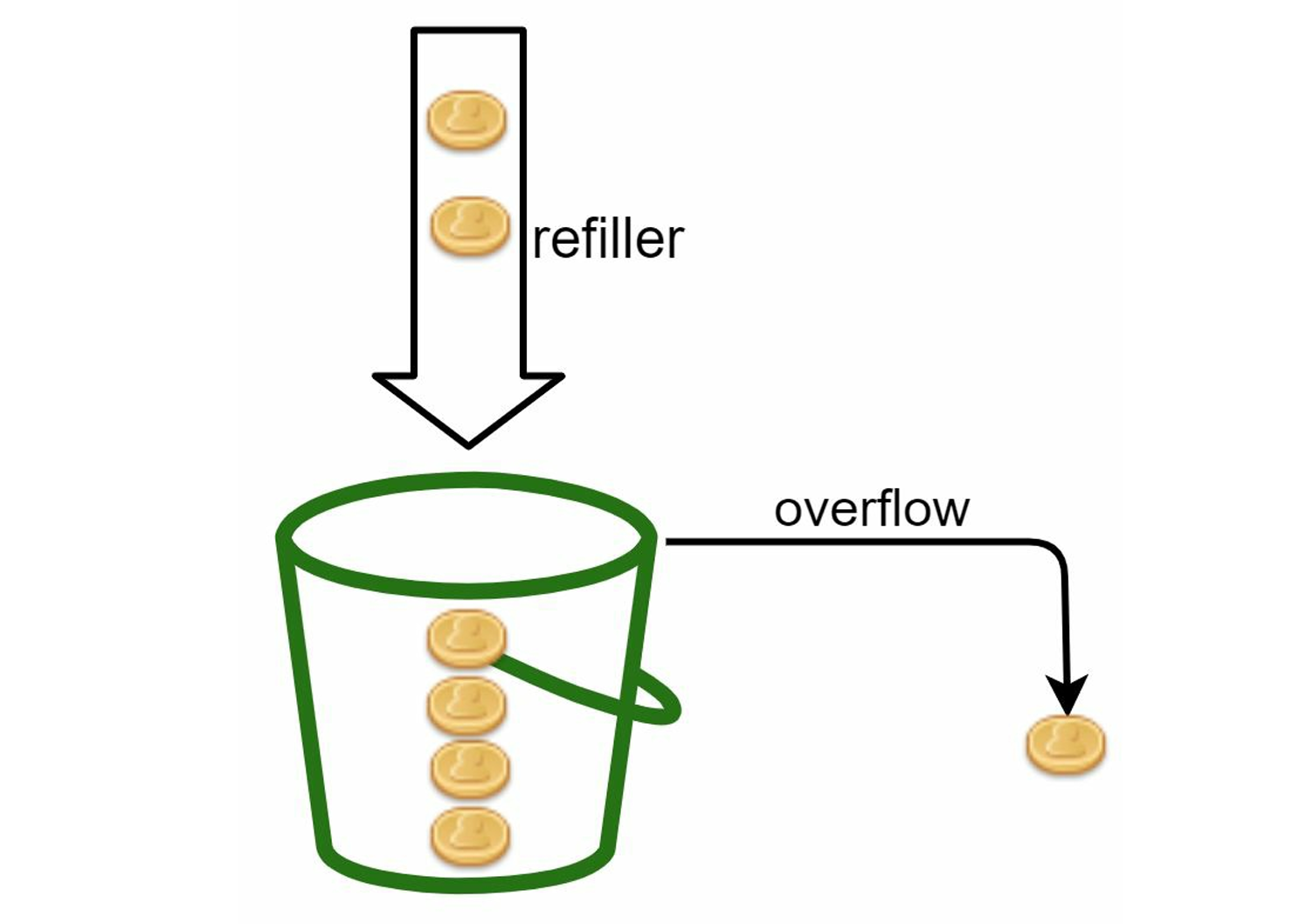 Figure: Token bucket algorithm - tokens are added at preset rates, requests consume tokens
Good for: Allowing short bursts while enforcing a steady average rate.
Pros:
- Allows burst traffic
- Memory efficient
- Simple logic
Cons:
- Requires tuning of bucket size and refill rate
3.2 Leaky Bucket
How it works:
- Requests enter a fixed-size queue.
- Processed at a steady outflow rate.
- If queue is full, new requests are dropped.
Good for: Smoothing request rates over time.
Pros:
- Enforces steady request rate
- Memory bounded
Cons:
- Delays or drops newer requests if older ones fill the queue
3.3 Fixed Window Counter
How it works:
- Count the number of requests per fixed time window (e.g. per second).
- Drop excess requests once the count exceeds the limit.
Pros:
- Easy to implement
- Memory efficient
Cons:
- Edge case flaw: Traffic bursts at window boundaries can exceed limits (e.g., 5 requests at 0:59 and 5 at 1:00 = 10 in 1 second)
3.4 Sliding Window Log
How it works:
- Logs timestamps of each request.
- On new request, remove old timestamps outside the time window.
- Allow request if log size < limit.
Pros:
- Precise control of request rate
Cons:
- High memory usage for storing logs
3.5 Sliding Window Counter
How it works:
- Mixes fixed windows with interpolation.
- Estimate current rate using current + previous window with weight.
Pros:
- Smooths rate spikes
- Memory efficient
Cons:
- Approximate — assumes uniform distribution in prior window
🔄 Algorithm Selection Guidelines
- Use Token Bucket if you need burst tolerance
- Use Leaky Bucket for steady, controlled flow
- Use Fixed Window for simple, memory-efficient solution
- Use Sliding Window Log for precise control (if memory allows)
- Use Sliding Window Counter for balance between accuracy and efficiency
4. System Architecture
🏗️ Deployment Options
Client-side
- Pros: Reduces server load
- Cons: Not secure or reliable (can be bypassed)
- Verdict: Not recommended for critical rate limiting
Server-side (Embedded)
- Pros: More secure and controllable
- Cons: Increases complexity in each service
- Use case: When you have few services
Middleware / API Gateway (Recommended)
- Pros: Centralized control, easier to manage rules
- Cons: Single point of failure, potential bottleneck
- Use case: Most production systems
📝 Example: A middleware intercepts requests, applies rate limiting logic, and only forwards allowed requests to API servers.
🧱 High-Level System Design
[Client] → [Load Balancer] → [Rate Limiting Middleware] → [API Gateway] → [Backend Services]
                                        ↓
                                   [Redis Cluster]
                                        ↓
                                 [Rules Configuration]
Components:
- Rate limiting middleware: Core logic for checking and updating counters
- Redis cluster: Shared state for counters across multiple instances
- Rules loader: Loads and caches rate limiting rules
- Monitoring: Tracks rate limiting metrics and alerts
5. Implementation Details
🗂️ Rule Management
Rule definition (based on domain, user type, API, etc.) Usually written in config files and stored on disk.
Rate limiting rules are inspired by Lyft's open-sourced rate limiting component. Here are real-world examples:
Example 1: Marketing message limits
domain: messaging
descriptors:
  - key: message_type
    value: marketing
    rate_limit:
      unit: day
      requests_per_unit: 5
This rule: max 5 marketing messages per day.
Example 2: Authentication limits
domain: auth
descriptors:
  - key: auth_type
    value: login
    rate_limit:
      unit: minute
      requests_per_unit: 5
This rule: clients cannot login more than 5 times in 1 minute.
Rule characteristics:
- Rules are generally written in configuration files and saved on disk
- Workers frequently pull rules from disk and store them in cache
- Rules can be updated without service restart by reloading configuration
🔄 Request Flow
Step-by-step detailed flow:
- Client sends request → Rate limiting middleware
- Middleware processes request:
- Loads rate limiting rules from cache
- Fetches counters and last request timestamp from Redis cache
- Based on the response, the rate limiter decides:
- If request is not rate limited → forwards to API servers
- If request is rate limited → returns HTTP 429 error to client
- For rate-limited requests:
- Request is either dropped or forwarded to queue (for later processing)
- Response includes appropriate headers (
X-RateLimit-*)
Detailed system workflow:
- Rules storage: Rules are stored on disk, workers frequently pull rules and store them in cache
- Cache layer: Rate limiter middleware loads rules from cache for fast access
- Counter management: Redis maintains request counters with TTL for automatic cleanup
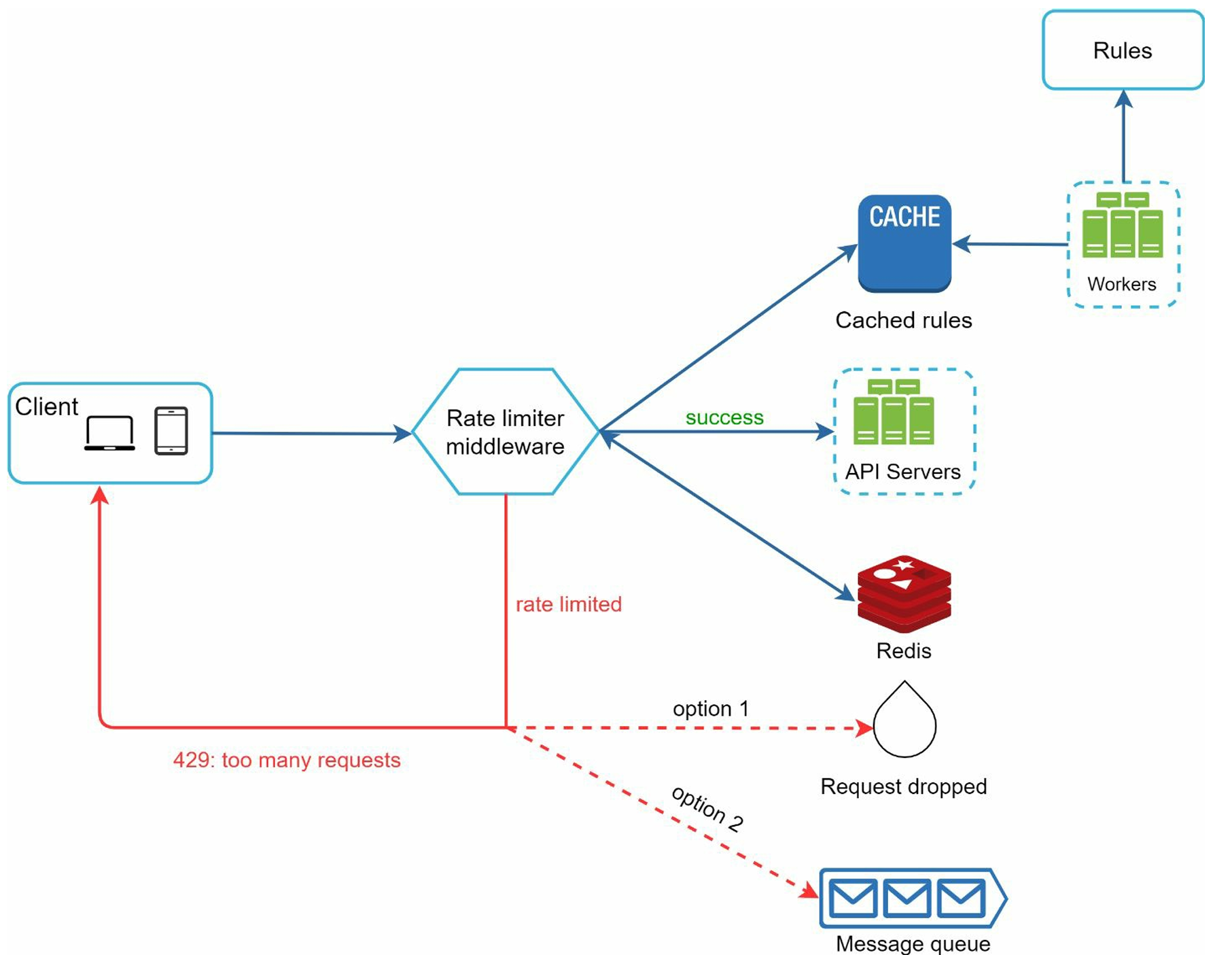 Figure: Detailed rate limiter system design showing the complete request flow and component interactions
📬 Response Headers
When a client sends requests, the rate limiter returns the following HTTP headers to help clients understand their current status:
Standard Rate Limiting Headers:
X-RateLimit-Remaining: The remaining number of allowed requests within the current time windowX-RateLimit-Limit: How many calls the client can make per time windowX-RateLimit-Retry-After: The number of seconds to wait until you can make a request again without being throttled
Response behavior:
- Normal requests: Include all three headers to inform client of current status
- Rate-limited requests: Return HTTP 429 (Too Many Requests) with
X-RateLimit-Retry-Afterheader - Error case: If rate limiting service fails, may return HTTP 503 (Service Unavailable)
These headers help clients behave more gracefully when throttled and implement proper backoff strategies.
⚙️ Redis Implementation
Commands Used:
INCR– increase request countEXPIRE– set TTL on key (resets count automatically after window)
Example Redis operations for Fixed Window Counter:
MULTI
INCR rate_limit:user:123:2023-07-19-14:30
EXPIRE rate_limit:user:123:2023-07-19-14:30 60
EXEC
🧾 Error Handling
- Return HTTP 429 (Too Many Requests)
- Optional: Queue the request to retry later (if business allows)
- Client should back off and retry after a specific time
6. Scale & Optimization
🌐 Distributed System Challenges
Building a rate limiter in a single server environment is straightforward, but scaling to support multiple servers and concurrent threads introduces significant challenges:
Race Conditions
The Problem: Rate limiters work at high level as follows:
- Read the counter value from Redis
- Check if (counter + 1) exceeds the threshold
- If not, increment the counter value by 1 in Redis
Race condition scenario:
- Assume counter value in Redis is 3
- Two requests concurrently read the counter value before either writes back
- Each request believes it has counter value 4 and increments to 5
- However, the correct counter value should be 5, not 4
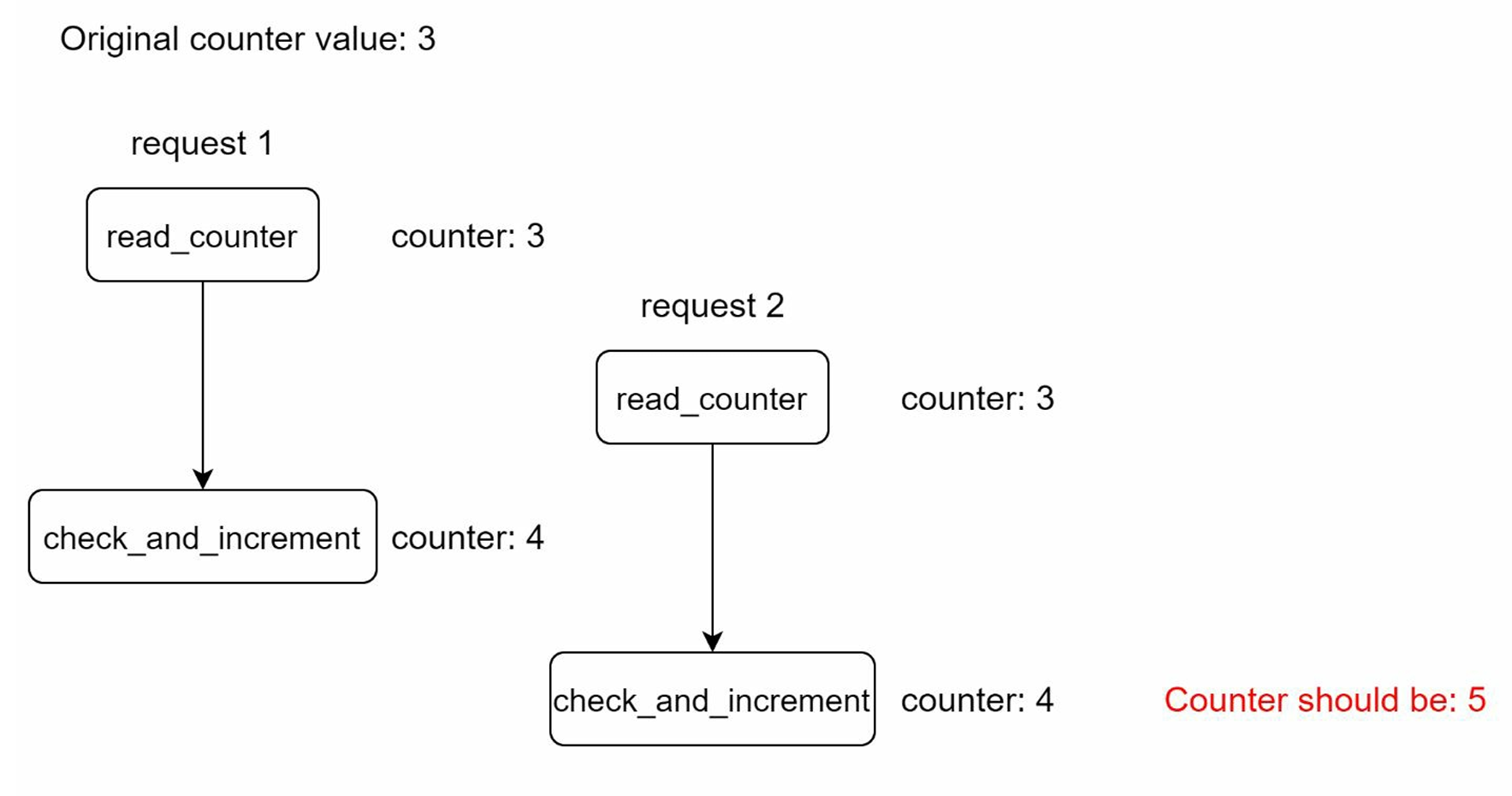 Figure: Race condition example - two concurrent requests reading and updating the same counter
Solutions:
- Locks: Most obvious but significantly slow down the system
- Lua script: Atomic execution of read-check-write operations
- Redis sorted sets: For more complex rate limiting scenarios
- Atomic operations: Use Redis
INCRwhich is inherently atomic
Synchronization Issues
The Problem: When multiple rate limiter servers are used, synchronization becomes critical.
Scenario:
- Client 1 sends requests to Rate Limiter 1
- Client 2 sends requests to Rate Limiter 2
- Due to load balancing, clients might switch between rate limiters
- Without synchronization, Rate Limiter 1 has no data about Client 2's requests
Solutions:
- Avoid sticky sessions: Not scalable or flexible
- Centralized data store: Use Redis as shared state (recommended approach)
- Eventual consistency: Accept some temporary inconsistency for better performance
🚀 Performance Optimization
Performance optimization is crucial for system design interviews. Here are key areas to improve:
1. Multi-Data Center Setup
Why it matters:
- Latency is high for users located far from the data center
- Geographic distribution reduces response times significantly
Implementation:
- Most cloud providers build many edge server locations worldwide
- Example: Cloudflare has 194+ geographically distributed edge servers (as of 2020)
- Traffic is automatically routed to the closest edge server
- Each edge location maintains local rate limiting state with periodic synchronization
2. Use In-Memory Caches
- Redis is common choice for performance-critical systems
- Fast, supports TTL (automatic counter reset), distributed
3. Shard Counters
- Use consistent hashing (hash by user ID or IP) to distribute counters across Redis shards
- Reduces contention and improves scalability
4. Batch or Delay Non-Critical Updates
- For non-critical metrics or audit logs, queue them for batch processing
5. Local Cache + Periodic Sync
- For extremely high QPS, use local in-memory counters with periodic sync to Redis
- Trade-off: eventual consistency for better performance
6. Eventual Consistency Model
- Synchronize data with eventual consistency rather than strong consistency
- Reduces latency and improves system resilience
- Acceptable for most rate limiting use cases where brief inconsistencies are tolerable
📊 Monitoring & Metrics
After the rate limiter is deployed, gathering analytics data is crucial to ensure effectiveness. We need to monitor two primary aspects:
Algorithm Effectiveness
Key questions to answer:
- Is the rate limiting algorithm working as expected?
- Are we seeing the intended behavior under normal and peak loads?
Metrics to track:
- Request acceptance rate: Percentage of requests that pass through
- Request rejection rate: Percentage of requests that get rate limited
- Response time distribution: P50, P95, P99 latencies for rate limiter decisions
- Algorithm-specific metrics: Token bucket fill rates, sliding window accuracy
Rule Effectiveness
Key questions to answer:
- Are the rate limiting rules too strict or too lenient?
- Do rules need adjustment based on traffic patterns?
Monitoring scenarios:
- Rules too strict: Many valid requests are dropped → need to relax rules
- Rules too lenient: Rate limiter becomes ineffective during traffic spikes → need stricter rules
- Burst traffic handling: During flash sales or viral content, may need different algorithms (e.g., switch to Token Bucket)
Essential Metrics Collection
Operational metrics:
- Number of throttled requests per time window
- Rate limiter latency (should be < 1ms for high-performance systems)
- Cache hit/miss rates (for Redis and local caches)
- Request volume per endpoint/IP/user
- Error rates and failure modes
Business metrics:
- Revenue impact of rate limiting (for paid APIs)
- User experience metrics (bounce rate after being rate limited)
- Abuse prevention effectiveness (reduced bot traffic)
Tools and Implementation:
- Prometheus + Grafana: Open-source monitoring stack
- DataDog: Commercial APM solution
- Custom dashboards: Real-time visibility into rate limiting behavior
- Alerting: Automatic notifications when thresholds are exceeded
⚠️ Fault Tolerance
What happens if Redis or the rate limiter itself fails?
Strategies:
- Graceful degradation: Default to "allow" or "deny" policy if Redis is unavailable
- Replication / Clustering: Use Redis Sentinel or Cluster for HA
- Rate limiter fallbacks: Have a local in-memory fallback with basic throttling logic
7. Advanced Considerations
🧠 Design Trade-offs
-
Precision vs. Performance: Sliding Window Log = accurate but memory-intensive Token Bucket = simpler, more performant
-
Memory vs. Latency: Use appropriate eviction policies in Redis to manage memory
-
Burst Handling: Token Bucket allows bursts, Leaky Bucket smooths them
🎯 Advanced Interview Topics
1. Hard vs Soft Rate Limiting
Interview Question:
"What's the difference between hard and soft rate limiting, and when would you use each?"
Analysis:
-
Hard Rate Limiting: The number of requests cannot exceed the threshold under any circumstances
- Use case: Payment processing, security-critical APIs
- Implementation: Strict enforcement with immediate rejection
-
Soft Rate Limiting: Requests can exceed the threshold for a short period
- Use case: User-facing features, social media posting
- Implementation: Allow brief bursts, gradual throttling
2. Rate Limiting at Different Network Layers
Advanced Topic:
"Besides application-level rate limiting, what other layers can implement rate limiting?"
Layer-by-layer analysis:
- Application Layer (HTTP - Layer 7): What we've discussed extensively
- Network Layer (IP - Layer 3): Rate limiting by IP addresses using iptables
- Transport Layer (Layer 4): Connection-based rate limiting
- Infrastructure Level: Load balancer, CDN, and firewall rate limiting
OSI Model Context:
- Layer 1: Physical layer
- Layer 2: Data link layer
- Layer 3: Network layer (IP-based rate limiting)
- Layer 4: Transport layer (TCP/UDP rate limiting)
- Layer 5: Session layer
- Layer 6: Presentation layer
- Layer 7: Application layer (HTTP API rate limiting)
3. Client-Side Best Practices
Challenge:
"How should clients be designed to avoid being rate limited?"
Client design strategies:
- Use client cache: Avoid making frequent API calls for the same data
- Understand the limits: Read API documentation and respect rate limits
- Graceful error handling: Catch 429 errors and implement proper backoff
- Exponential backoff with jitter: Add randomization to retry logic
- Respect Retry-After headers: Use server-provided timing for retries
4. Algorithm Design Trade-offs in Real-world Systems
Interview Question:
"When would you favor token bucket over sliding window counters in production-grade systems?"
Analysis:
- Token Bucket is eventually consistent: good for bursty traffic like mobile posts or video uploads
- Sliding Window is strictly consistent: ideal for banking, identity verification, or API monetization where over-limit requests must not leak
5. Rate Limiting Across Microservices
Advanced Topic:
"How would you apply consistent global rate limits across microservices?"
Solutions:
- Services may have local limits, but business-level constraints often span services (e.g., "only 1000 messages per org/day")
- Use centralized rate-limiter (API Gateway or dedicated service with gRPC endpoints)
- Consider Redis-backed shared counters, distributed locks (Redlock), Kafka-based counter logs
6. Rate Limiting for Streaming Data
Challenge:
"Design a rate limiter for a video platform like Twitch where viewers send 10,000 chat messages per second."
Considerations:
- Latency critical? Token Bucket may not scale
- Use local in-memory rate limits with periodic sync to shared store (eventual convergence)
- For per-channel limits, shard by channel ID using consistent hashing
7. Failure Modes and Mitigations
Question:
"What happens if Redis fails mid-request? How would you build a fault-tolerant rate limiter?"
Advanced Solutions:
- fail-open vs fail-closed behavior (allow requests if Redis is down, or block them)
- Use redundant caches, multi-region Redis with replication, or fallback in-memory limiter
8. Multi-tenant Rate Limiting
Challenge:
"How would you implement rate limiting that applies different rules per user tier: free, pro, enterprise?"
Implementation:
- Rate limit rules depend on user profile lookup
- Need caching layer for user metadata (Redis or memory)
- Build rate limit rules DSL for product teams to configure
✅ Complete Design Process
Step-by-Step Approach
-
Clarify scope and goals
- Scale, target identity, expected behavior
- Functional and non-functional requirements
-
Choose algorithm
- Token Bucket, Sliding Window, etc.
- Based on burst tolerance, accuracy needs
-
Select architecture
- Middleware, API Gateway, or Embedded
- Consider single points of failure
-
Design data layer
- Use Redis with atomic ops and TTLs
- Plan for sharding and replication
-
Handle distributed challenges
- Race conditions, failover, consistency
-
Plan monitoring and ops
- Metrics, alerting, debugging
Key Takeaways
- Algorithm choice depends on requirements: burst tolerance vs. strict limits
- Redis is essential for distributed rate limiting: atomic, fast, TTL-aware
- Monitor everything: rate limiting behavior, performance, failure modes
- Plan for failure: graceful degradation when dependencies fail
- Test thoroughly in production-like environments
Interview Success Tips
- Ask clarifying questions first - shows systematic thinking
- Start with simple solution - then add complexity as needed
- Discuss trade-offs - show you understand engineering decisions
- Consider scale - how solution evolves with growth
- Think about operations - monitoring, debugging, maintenance
📚 Reference Materials
The following resources provide additional depth and real-world examples for rate limiting implementation:
Industry Best Practices
- Rate-limiting strategies and techniques - Google Cloud
- Twitter rate limits documentation
- Google Docs API usage limits
- AWS API Gateway request throttling
Real-world Implementations
- Stripe's approach to rate limiters
- Shopify REST Admin API rate limits
- Lyft's open-source rate limiting component
- Cloudflare's scale: counting millions of domains
Technical Deep Dives
- Better Rate Limiting With Redis Sorted Sets
- Scaling API with rate limiters - Lua script approach
- System Design: Rate limiter and Data modelling